Multi-platform content: from idea to review on one line
Grow's content tools are for businesses posting regularly on Xiaohongshu, Douyin, WeChat Channels, Weibo and Bilibili: keep ideas, let AI draft copy and images, schedule on a three-week calendar, publish when you confirm, and review by days since posting.
Ideas and drafting
Save a competitor's hit post or a customer's question from the comments as an idea in one click. AI drafts copy and images from your brand profile, using only the facts you confirmed there, and every draft is checked against platform word rules.
- Ideas from competitors' posts, customer questions or your own notes
- Image posts, videos and text posts
- Revise by chatting on the left while the draft updates on the right; every change is versioned
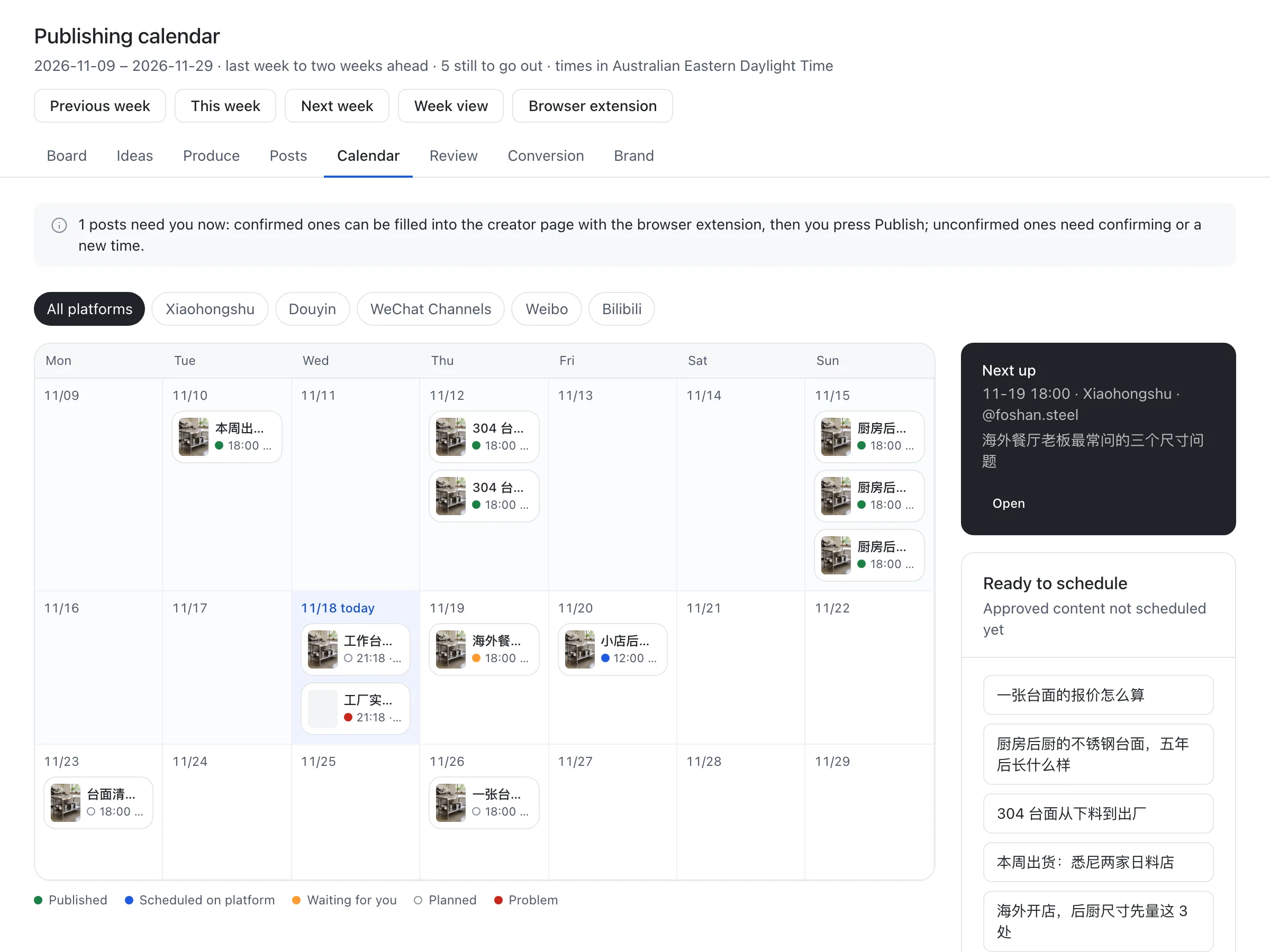
A three-week publishing calendar
The calendar shows last week through the next two weeks, each day with covers, status and views once published. Five colours separate published, scheduled on the platform, waiting for you, planned, and problems. Drag approved posts onto a day to schedule them.
- You confirm every post: for Xiaohongshu and Douyin, the Grow browser extension can fill the publish page on a computer and you press publish
- On a phone, copy the text, save the images and open the app
- Images a platform may refuse (WebP, HEIC and others) get a JPG copy when scheduled; the original stays
Reminders in your group chat
Connect a Feishu or WeCom group bot and Grow posts there when a post is due, when one did not go out, and when the platform's scheduled time differs from your plan by more than 5 minutes, plus a 9 am summary of the day.
Review: the same day as the last post
The content board shows the latest post's views, interactions and inquiries on each platform, and followers gained each day with publishing days marked. On day 1, 3 and 7 each post is compared with the account's previous post on the same day. Insights state what happened in the same period; they never claim a post caused it.
- Numbers read back from Xiaohongshu and Douyin creator dashboards by the extension, typed in, or pasted as a table
- Numbers you enter take precedence over the public page
Questions
- Does Grow publish for me automatically?
- Not on Chinese platforms. When a post is due you confirm it: for Xiaohongshu and Douyin the extension can fill the publish page on a computer and you press publish; elsewhere, and on a phone, you copy the text, save the images and post from the app.
- Which platforms are supported?
- Scheduling, reminders and review for Xiaohongshu, Douyin, WeChat Channels, Weibo and Bilibili. The browser extension fills publish pages and reads numbers back on Xiaohongshu and Douyin; on the others you enter numbers yourself.
- Where do the review numbers come from?
- From the Grow browser extension reading your Xiaohongshu and Douyin creator dashboards, from numbers you type in, or from a pasted export. For the same post, numbers you enter win.